Open topic with left hand navigation
The Meeting Minutes register lists all of the meetings in a workspace. Each of the columns displayed in this register shows information taken from any of the Meeting pages. The columns displayed depend on the current view.
The following table shows the specialized actions available in the Meeting Minutes register.
| From the Meeting Minutes register, you can... | Click |
|---|---|
|
Copy the selected Meeting document. This option is located under Tools. |
Copy to New Set |
|
Get the latest meeting in the selected set. This option is located under Tools. |
Get Latest Meeting In Set |
|
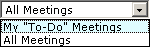
Show the meetings where you have been assigned responsibility for meeting items. |
|
For more information about the actions available in the Bid Package register, see "Proliance Registers". These actions may be limited by your security role.